Boldwin SDK Documentation
Welcome to the Boldwin SDK documentation. This guide will help you integrate Boldwin's advertising solutions into your mobile applications across Android, iOS, and Unity platforms.
What is Boldwin SDK?
Boldwin SDK is a comprehensive mobile advertising solution that provides:
- Multiple Ad Formats: Banner, Interstitial, and Rewarded Video
- Cross-Platform Support: Native SDKs for Android and iOS, plus Unity integration
- Mediation Support: Seamless integration with AppLovin MAX and ironSource LevelPlay
- Advanced Targeting: OpenRTB 2.5 compliant targeting system for precise audience reach
- Analytics: Comprehensive reporting and performance metrics
Integration Scenarios
Choose the integration method that best fits your app:
Scenario 1: Mediation Integration
Ideal for apps already using mediation platforms to manage multiple ad networks.
- AppLovin MAX: Supports banner, interstitial, and rewarded video ads.
- ironSource LevelPlay: Supports waterfall optimization for ad delivery.
- Best for: Apps seeking simplified ad management and automatic optimization
Scenario 2: Direct Integration
Perfect for apps that want full control over ad implementation and direct access to all SDK features.
- Android: Install via Gradle dependency from Maven Central
- iOS: Install via Swift Package Manager or CocoaPods
- Best for: Apps with custom ad layouts, advanced targeting needs, or specific mediation requirements
Scenario 3: Unity Integration
Designed for Unity games requiring mediation-based monetization.
- Unity + AppLovin MAX: Seamless integration for Unity games.
- Unity + ironSource: Complete monetization solution.
- Best for: Unity games looking for easy-to-implement ad solutions
Getting Started
- Choose Your Platform: Select Android, iOS, or Unity based on your app.
- Pick Integration Method: Direct SDK integration or mediation platform.
- Follow Setup Guide: Use our step-by-step integration guides.
- Configure Targeting: Implement advanced targeting for better performance.
- Test & Launch: Verify integration and go live.
Demo Applications
Explore our demo applications to see the Boldwin SDK in action:
- Android Demo - Example apps showing banner, interstitial, and rewarded video implementations
- iOS Demo - Example apps showing banner, interstitial, and rewarded video implementations
- Unity Demo - Example Unity project with mediation platform integration
Architecture Overview
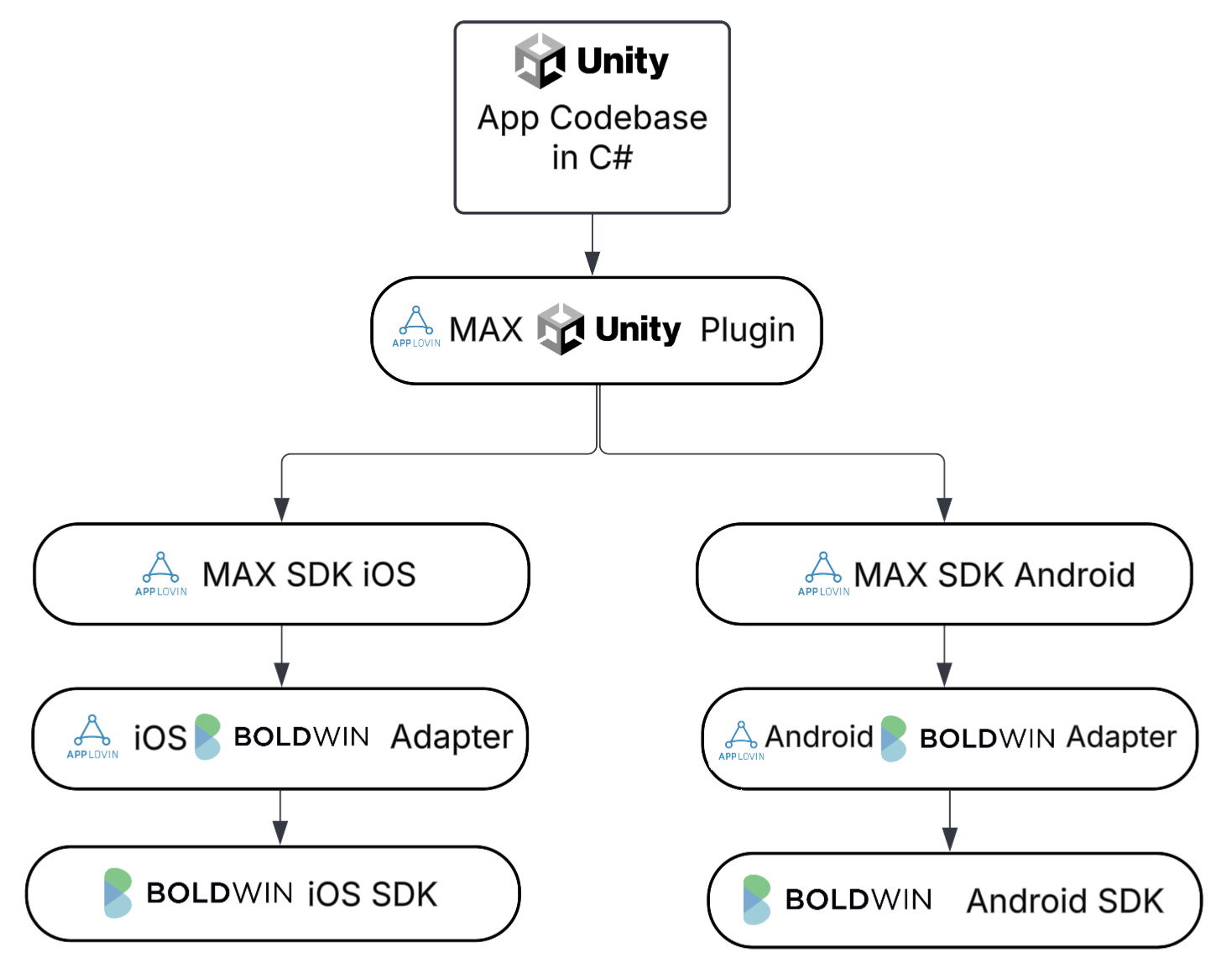
The Boldwin SDK follows a modular architecture designed for flexibility and performance:
- Core SDK: Handles initialization, configuration, and device data collection
- Ad Units: Specialized components for different ad formats
- Targeting System: OpenRTB-compliant audience targeting
- Mediation Adapters: Platform-specific adapters for seamless integration
Next Steps
Choose your integration guide to get started:
- Native Android Apps: See Android Integration Guide
- Native iOS Apps: See iOS Integration Guide
- Unity Games: See Unity Integration Guide (mediation required)